
Toyota RAV4 (XA40) 2013-2018 Service Manual: Front passenger side seat belt warning light malfunction
Description
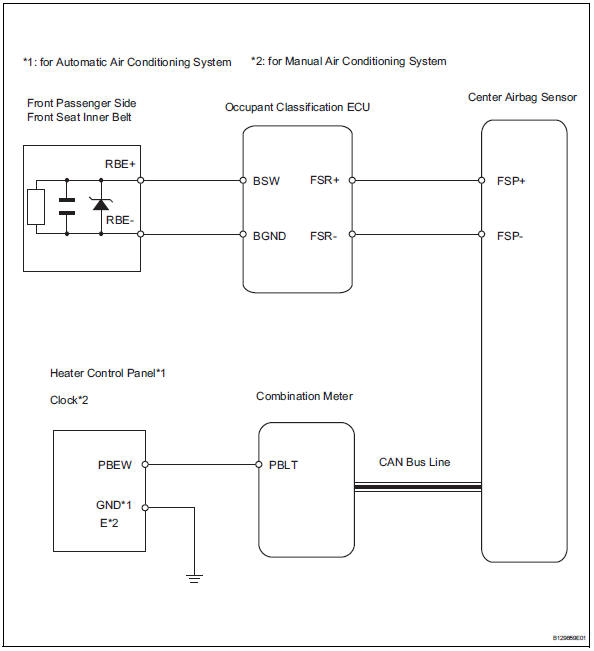
When the ignition switch is on, the center airbag sensor transmits front seat inner belt status signals to the combination meter through the can bus line. If the front passenger seat belt is not fastened, the heater control panel (automatic a/c) or clock (manual a/c) blinks the front passenger seat belt warning light. If the seat belt is fastened, the warning light goes off.
Notice:
The seat belt warning system uses the can bus line. Before troubleshooting the seat belt warning system, perform "communication function check" by following "how to proceed with troubleshooting" to confirm that the communication systems are normal.
Wiring diagram
Inspection procedure
- Perform active test by intelligent tester
- Select the active test, use the intelligent tester to generate a control command, and then check that the seat belt warning light operates.
Center airbag sensor:

Ok: passenger side seat belt warning light operates normally.


- Check a/c type
- Check system.



- Check heater control panel (power source circuit)
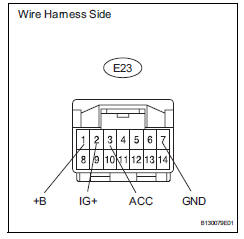
- Disconnect the e23 panel connector.
- Measure the voltage and resistance of the wire harness side connector.
Standard voltage 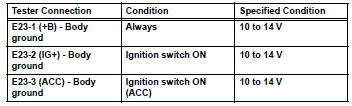
Standard resistance 


- Check wire harness (heater control panel - combination meter assembly)
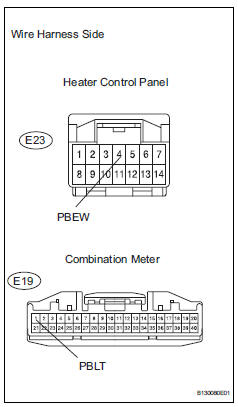
- Disconnect the e23 panel connector.
- Disconnect the e19 meter connector.
- Measure the resistance of the wire harness side connectors.
Standard resistance 


- Inspect heater control panel
- Remove the heater control panel.
- Apply battery voltage and check that the front passenger side seat belt warning light illuminates.
Ok 
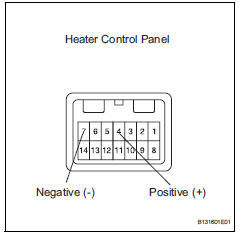
Hint:
When the battery's negative (-) lead is applied to terminal 4 and the positive (+) lead is applied to terminal 7, the seat belt warning light does not illuminate.


- Check clock sub-assembly (power source circuit)
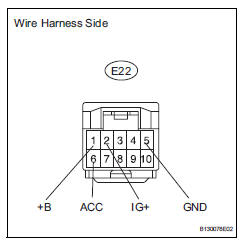
- Disconnect the e22 clock connector.
- Measure the voltage and resistance of the wire harness side connector.
Standard voltage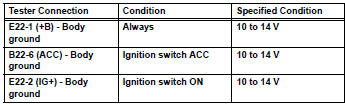
Standard resistance


- Check wire harness (clock - combination meter)
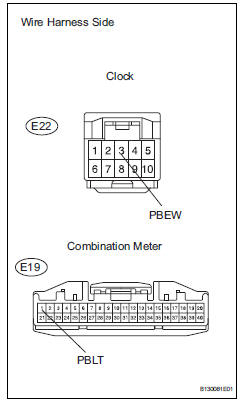
- Disconnect the e22 clock connector.
- Disconnect the e19 meter connector.
- Measure the resistance of the wire harness side connectors.
Standard resistance 


- Inspect clock sub-assembly
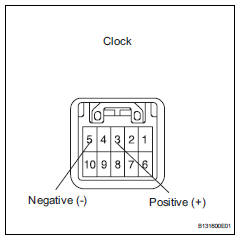
- Remove the clock.
- Apply battery voltage and check that the front passenger side seat belt warning light illuminates.
Ok 
Hint:
When the battery's negative (-) lead is applied to terminal 3 and the positive (+) lead is applied to terminal 5, the seat belt warning light does not illuminate.


Replace combination meter assembly
 Driver side seat belt warning light does not operate
Description
When the ignition switch is on, the center airbag sensor transmits front seat
inner belt status signals to
the combination meter through the can bus line. If the driver seat belt is no ...
 Front seat inner belt assembly
Components
...
Other materials:
Correct driving posture
Adjust the angle of the seatback
so that you are sitting
straight up and so that you do
not have to lean forward to
steer.
Adjust the seat so that you can
depress the pedals fully and so
that your arms bend slightly at
the elbow when gripping the
steering wheel.
Lock the head ...
For vehicles equipped with mobile communication systems
Install the antenna as far away from the ecu and
sensors of the vehicle electronic systems as
possible.
Install an antenna feeder at least 20 cm (7.87 In.)
Away from the ecu and sensors of the vehicle
electronic systems. For details about ecu and
sensor locations, refer to the sec ...
Front seat frame with adjuster
Inspection
Inspect front seat frame with adjuster
Check operation of the seat frame (slide motor).
Check if the seat frame moves smoothly when
the battery is connected to the slide motor
connector terminals.
Ok
If the result is not as specified, replace the seat
frame w ...
