
Toyota RAV4 (XA40) 2013-2018 Service Manual: Seat belt warning system
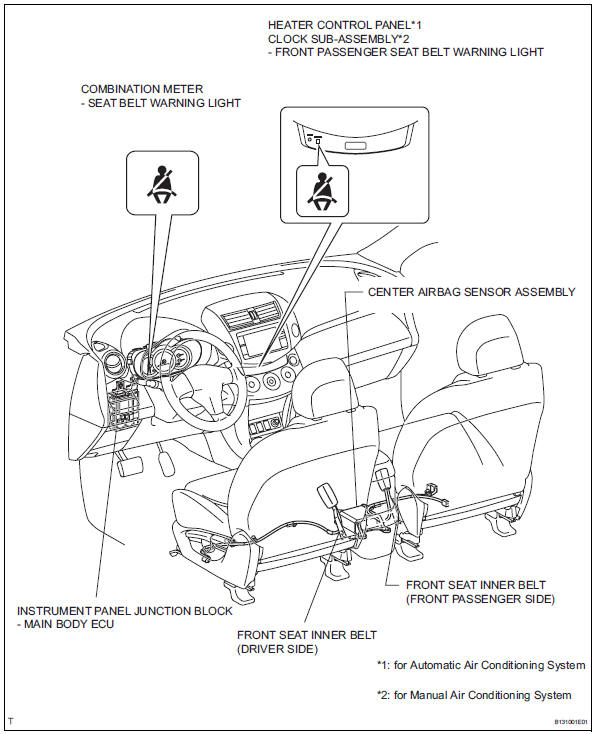
Parts location
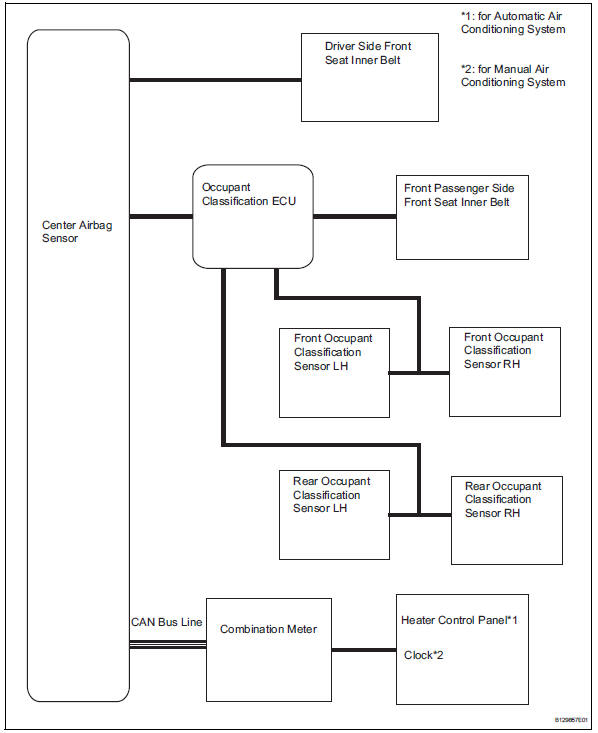
System diagram
- System description
- How to proceed with troubleshooting
- Operation check
- Problem symptoms table
- Terminals of ecu
- Diagnosis system
- Data list / active test
- On-vehicle inspection
 Seat belt
...
 System description
Driver seat belt warning light
When the driver seat belt is not fastened with the
ignition switch on, the driver seat belt warning light
on the combination meter comes on to inform the
...
Other materials:
Winter driving tips
Carry out the necessary
preparations and inspections
before driving the
vehicle in winter. Always
drive the vehicle in a manner
appropriate to the prevailing
weather conditions.
Pre-winter preparations
Use fluids that are appropriate
to the prevailing outside temperatures.
Engine oil
Engine c ...
If you have a flat tire
Your vehicle is equipped with a spare tire. The flat tire can be
replaced with the spare tire.
WARNING
â– If you have a flat tire
Do not continue driving with a flat tire.
Driving even a short distance with a flat tire can damage the tire and the
wheel beyond repair, which could result in an accide ...
Camshaft position correlation (bank 1 sensor a)
Dtc P0016 P0016 crankshaft position - camshaft position correlation
(bank 1 sensor a)
Description
In the vvt (variable valve timing) system, the appropriate intake valve open
and close timing is
controlled by the ecm. The ecm performs intake valve control by performing the
following: 1) cont ...
