
Toyota RAV4 (XA50) 2019-2026 Owners Manual: Parking Support Brake function (static objects)
If the sensors detect a static object, such as a wall, in the traveling direction of the vehicle and the system determines that a collision may occur due to the vehicle suddenly moving forward due to an accidental accelerator pedal operation, the vehicle moving the unintended direction due to the wrong shift position being selected, or while parking or traveling at low speeds, the system will operate to lessen the impact with the detected static object and reduce the resulting damage.
Examples of function operation
This function will operate in situations such as the following if an object is detected in the traveling direction of the vehicle.
â– When traveling at a low speed and the brake pedal is not depressed, or is depressed late
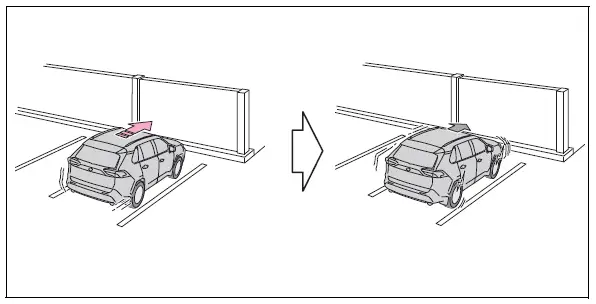
â– When the accelerator pedal is depressed excessively
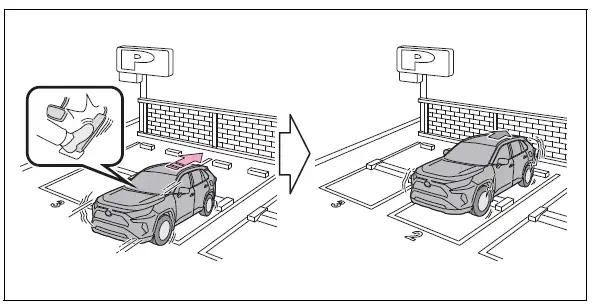
â– When the vehicle moves in the unintended direction due to the wrong shift position being selected
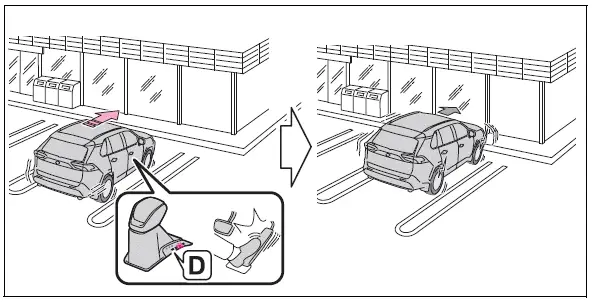
â– The Parking Support Brake function (static object) will operate when
The function will operate when the PKSB OFF indicator is not illuminated or flashing and all of the following conditions are met:
- Engine output restriction control
- The Parking Support Brake is enabled.
- The vehicle speed is approximately 9 mph (15 km/h) or less.
- There is a static object in the traveling direction of the vehicle and approximately 6 to 13 ft. (2 to 4 m) away.
- The Parking Support Brake determines that a stronger-than-normal brake operation is necessary to avoid a collision.
- Brake control
- Engine output restriction control is operating
- The Parking Support Brake determines that an immediate brake operation is necessary to avoid a collision.
â– The Parking Support Brake function (static objects) will stop operating when
The function will stop operating if any of the following conditions are met:
- Engine output restriction control
- The Parking Support Brake is disabled.
- The system determines that the collision has become avoidable with normal brake operation.
- The static object is no longer approximately 6 to 13 ft. (2 to 4 m) away from the vehicle or in the traveling direction of the vehicle.
- Brake control
- The Parking Support Brake is disabled.
- Approximately 2 seconds have elapsed since the vehicle was stopped by brake control.
- The brake pedal is depressed after the vehicle is stopped by brake control.
- The static object is no longer approximately 6 to 13 ft. (2 to 4 m) away from the vehicle or in the traveling direction of the vehicle.
â– Detection range of the Parking Support Brake function (static objects)
The detection range of the Parking Support Brake function (static objects) differs from the detection range of the intuitive parking assist.
Therefore, even if the intuitive parking assist detects an object and provides a warning, the Parking Support Brake function (static objects) may not start operating.
â– Situations in which the Parking Support Brake function (static objects) may not operate
When the shift lever is in N
 Enabling/Disabling the
Parking Support Brake
Enabling/Disabling the
Parking Support Brake
The Parking Support Brake can
be enabled/disabled on the
screen of the multi-information
display. All of the Parking Support
Brake functions (static
objects and rear-crossing vehicles)
are enabled/di ...
 Parking Support Brake
function (rear-crossing
vehicles)
Parking Support Brake
function (rear-crossing
vehicles)
If a rear radar sensor detects a vehicle approaching from the
right or left at the rear of the vehicle and the system determines
that the possibility of a collision is high, this function
will perform ...
Other materials:
Diagnosis system
Description
Engine immobiliser system data and diagnostic
trouble codes (dtcs) can be read through the
vehicle's data link connector 3 (dlc3). In some
cases, a malfunction may be occurring in the engine
immobiliser system even though the security
indicator light is not illuminated ...
Data list / active test
Read data list
Hint:
Using the intelligent tester's data list allows switch,
sensor, actuator and other item values to be read without
removing any parts. Reading the data list early in
troubleshooting is one way to save time.
Connect the intelligent tester to the dlc3.
Turn the igni ...
Listening to bluetooth®
audio
The bluetooth® audio system enables the user to enjoy music
played on a portable player from the vehicle speakers via wireless
communication.
When a bluetooth® device cannot be connected, check the connection
status on the “bluetooth* audio� screen. If the device is not connected,
either ...
