
Toyota RAV4 (XA50) 2019-2026 Owners Manual: Parking Support Brake function (rear-crossing vehicles)
If a rear radar sensor detects a vehicle approaching from the right or left at the rear of the vehicle and the system determines that the possibility of a collision is high, this function will perform brake control to reduce the likelihood of an impact with the approaching vehicle.
Examples of function operation
This function will operate in situations such as the following if a vehicle is detected in the traveling direction of the vehicle.
â– When reversing, a vehicle is approaching and the brake pedal is not depressed, or is depressed late
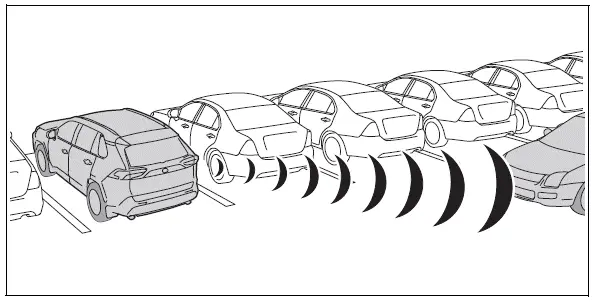
â– The Parking Support Brake function (rear-crossing vehicles) will operate when
The function will operate when the PKSB OFF indicator is not illuminated or flashing and all of the following conditions are met:
- Engine output restriction control
- The Parking Support Brake is enabled.
- The vehicle speed is approximately 9 mph (15 km/h) or less.
- Vehicles are approaching from the right or left at the rear of the vehicle at a traveling speed of approximately 5 mph (8 km/h) or more.
- The shift lever is in R.
- The Parking Support Brake determines that a stronger than normal brake operation is necessary to avoid a collision with an approaching vehicle.
- Brake control
- Engine output restriction control is operating
- The Parking Support Brake determines that an emergency brake operation is necessary to avoid a collision with an approaching vehicle.
â– The Parking Support Brake function (rear-crossing vehicles) will stop operating when
The function will stop operating if any of the following conditions are met:
- Engine output restriction control
- The Parking Support Brake is disabled.
- The collision becomes avoidable with normal brake operation.
- A vehicle is no longer approaching from the right or left at the rear of the vehicle.
- Brake control
- The Parking Support Brake is disabled.
- Approximately 2 seconds have elapsed since the vehicle was stopped by brake control.
- The brake pedal is depressed after the vehicle is stopped by brake control.
- A vehicle is no longer approaching from the right or left at the rear of the vehicle.
â– Detection area of the Parking Support Brake function (rear-crossing vehicles)
The detection area of the Parking Support Brake function (rear-crossing vehicles) differs from the detection area of the RCTA function. Therefore, even if the RCTA function detects a vehicle and provides an alert, the Parking Support Brake function (rear-crossing vehicles) may not start operating.
 Parking Support Brake function
(static objects)
Parking Support Brake function
(static objects)
If the sensors detect a static object, such as a wall, in the
traveling direction of the vehicle and the system determines
that a collision may occur due to the vehicle suddenly moving
forward due to ...
 Stop & Start system
The Stop & Start system
stops and starts the engine
according to brake pedal or
shift lever operation when
the vehicle is stopped, such
as at a stoplight, intersection,
etc., in order to
improve f ...
Other materials:
Symptom confirmation and diagnostic trouble code
Hint:
The diagnostic system in the rav4 has various
functions.
The first function is the diagnostic trouble code
(dtc) check. A dtc is a code stored in the ecu
memory whenever a malfunction in the signal circuits
to the ecu occurs. In a dtc check, a previous
malfunction's dtc can be ch ...
Indications on multi-information
display
Vehicles with 7-inch display
LTA indicator
The illumination condition of the
indicator informs the driver of the
system operation status.
Illuminated in white: LTA system is
operating.
Illuminated in green: Steering
wheel assistance of the steering
assist function or lane centering
function is ...
Rear axle hub and bearing
Components
On-vehicle inspection
Remove rear wheel
Disconnect rear drive shaft assembly lh
(for 4wd)
Disconnect the drive shaft (see page ds-69).
Remove rear disc brake cylinder assembly
lh (see page br-55)
Remove rear disc (see page br-57)
Check bearing backlash a ...
