
Toyota RAV4 (XA50) 2019-2026 Owners Manual: Stop & Start system
The Stop & Start system stops and starts the engine according to brake pedal or shift lever operation when the vehicle is stopped, such as at a stoplight, intersection, etc., in order to improve fuel economy and reduce noise pollution caused by the engine idling.
Stop & Start system operation
â– Stopping the engine
While driving with the D shift position selected, depress the brake pedal and stop the vehicle.
The engine will stop automatically.
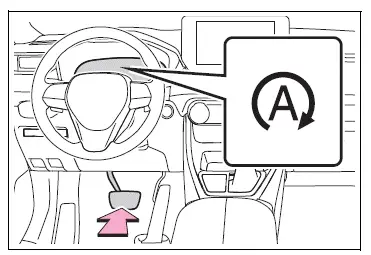
When the engine stops, the Stop & Start indicator will illuminate.
â– Restarting the engine
Release the brake pedal. The engine will start automatically.
When the engine starts, the Stop & Start indicator will turn off.
â– When the brake hold system is operating
- When the engine is stopped by the Stop & Start system, if the brake pedal is released the engine will remain stopped.
- If the accelerator pedal is depressed while the engine is stopped by the Stop & Start system, the engine will restart.
- While the engine is stopped by the Stop & Start system, if the engine is restarted, the brake hold system will continue to apply the brakes, unless the operation conditions of the brake hold system are no longer met.
â– When the dynamic radar cruise control with full-speed range is operating
- When the vehicle is stopped by the dynamic radar cruise control with full-speed range, the engine will stop automatically even though the brake pedal is not depressed.
- When the preceding vehicle starts off, the engine will restart automatically.
- If the engine is restarted by the Stop & Start system while the vehicle is stopped by the dynamic radar cruise control with full-speed range, the vehicle will remain stopped.
Disabling the Stop & Start system
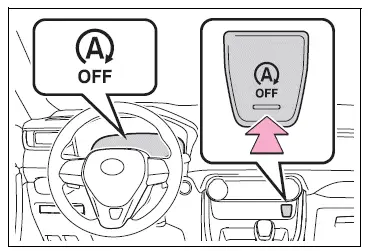
Press the Stop & Start cancel switch to disable the Stop & Start system.
The Stop & Start cancel indicator will illuminate.
Pressing the switch again will enable the Stop & Start system and the Stop & Start cancel indicator will turn off.
â– Automatic enabling of the Stop & Start system
If the Stop & Start system is disabled using the Stop & Start cancel switch, it will be automatically re-enabled once the engine switch is turned off and then the engine is started.
 Parking Support Brake
function (rear-crossing
vehicles)
Parking Support Brake
function (rear-crossing
vehicles)
If a rear radar sensor detects a vehicle approaching from the
right or left at the rear of the vehicle and the system determines
that the possibility of a collision is high, this function
will perform ...
 Hill-start assist control
When the engine is stopped by
the Stop & Start system when
the vehicle is on an incline,
when the brake pedal is
released, brake force is temporarily
maintained to prevent the
vehicle from rolling ...
Other materials:
Evaporator temperature sensor circuit
Description
The no. 1 Cooler thermistor (evaporator temperature sensor) is installed on
the evaporator in the air
conditioning unit to detect the temperature of the cooled air that has passed
through the evaporator and to
control the air conditioner. It sends signals to the air conditioni ...
Maintenance data
(fuel, oil level, etc.)
Dimensions and weights
*: Unladen vehicle
Vehicle identification
Vehicle identification number
The vehicle identification number (vin) is the legal identifier for
your vehicle. This is the primary identification number for your
toyota. It is used in registering the ownership of your vehicl ...
How to use this manual
General information
General description
This manual is written in accordance with sae
j2008.
Diagnosis
Removing / installing, replacing, disassembling
/ reassembling, checking and adjusting
Final inspection
The following procedures are omitted from this
manual. Howeve ...
