
Toyota RAV4 (XA40) 2013-2018 Service Manual: Installation
Caution:
Be sure to read the precautionary notices concerning the srs airbag system before servicing it (see page rs-1).
- Install front passenger airbag assembly
- Attach the rear side hook of the front passenger airbag to the rear side airbag door.
- Bend the front side hook so that it attaches to the front side airbag door.
- Install the instrument panel upper (see page ip-9).
- Install the 2 bolts to the reinforcement.
Torque: 20 n*m (203 kgf*cm, 14 ft.*Lbf)
- Connect the connector to the airbag.
Notice:
When handling the airbag connector, do not damage the airbag wire harness.
- Attach the wire harness clamp to the bracket.
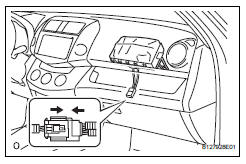
- Install glove compartment door assembly (see page ip-9)
- Connect cable to negative battery terminal
- Check srs warning light
- Check the srs warning light (see page rs-34).
 Removal
Caution:
Be sure to read the precautionary notices concerning the
srs airbag system before servicing it (see page rs-1).
Disconnect cable from negative battery
terminal
Caution:
Wait at le ...
 Disposal
Hint:
When scrapping a vehicle equipped with an srs or disposing
of the front passenger side knee airbag, be sure to deploy the
airbag first in accordance with the procedure described
below. If an ...
Other materials:
Light bulbs
You may replace the following
bulbs by yourself. The
difficulty level of replacement
varies depending on
the bulb. If necessary bulb
replacement seems difficult
to perform, contact your
Toyota dealer.
For more information about
replacing other light bulbs,
contact your Toyota dealer.
Preparing for ...
Check mode procedure
Check mode (signal check)
Connect the intelligent tester (with can vim) to the
dlc3.
Turn the ignition switch on.
Select the "signal check", and continue
checking with the intelligent tester.
Notice:
Select the "signal check" from the "dtc
check&quo ...
Headlight (hi-beam) circuit
Description
The body ecu controls the headlight relay, no. 2 Daytime running light relay
(marking: drl no. 2) And
no. 4 Daytime running light relay (marking: drl no. 4).
Wiring diagram
Inspection procedure
Perform active test by intelligent tester
Connect the intelligent test ...
