
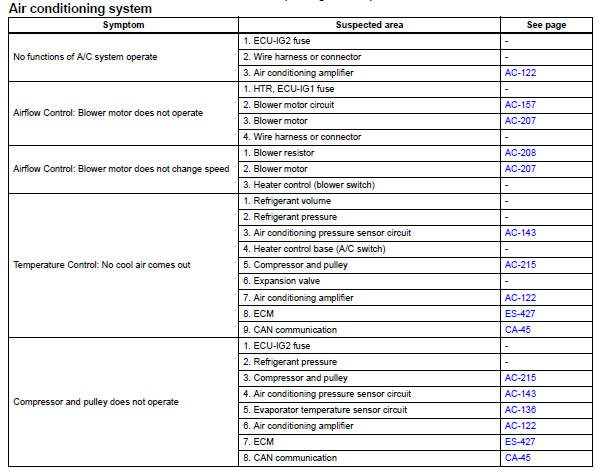
Toyota RAV4 (XA40) 2013-2018 Service Manual: Problem symptoms table (2005/11-2006/01)
Hint:
- Use the table below to help determine the cause of the problem symptom. The potential causes of the symptoms are listed in order of probability in the "suspected area" column of the table. Check each symptom by checking the suspected areas in the order they are listed. Replace parts as necessary.
- Inspect the fuses and relays related to this system before inspecting the suspected areas below.
 How to proceed with troubleshooting (2006/01- )
Hint:
Use these procedures to troubleshoot the air conditioning
system
*: Use the intelligent tester.
Vehicle brought to workshop
Customer problem analysis and symptom check
...
 Problem symptoms table (2006/01- )
Hint:
Use the table below to help determine the cause of the
problem symptom. The potential causes of the symptoms
are listed in order of probability in the "suspected area"
colum ...
Other materials:
Evaporative emission control system incorrect purge flow
Dtc summary
Description
The description can be found in the evap (evaporative emission) system (see
page es-335).
Inspection procedure
Refer to the evap system (see page es-340).
Monitor description
The two monitors, key-off and purge flow, are used to detect malfunctions
relating ...
Audio system
Operations such as listening to audio, using the hands-free
phone, confirming vehicle information and changing audio system
settings are started by using the following buttons.
Audio system operation buttons
“Audio� button
Display the “select audio source� screen or audio top s ...
Toyota Safety Sense 2.5
The Toyota Safety Sense
2.5 consists of the following
drive assist systems and
contributes to a safe and
comfortable driving experience:
Driving assist system
PCS (Pre-Collision System)
LTA (Lane Tracing Assist)
AHB (Automatic High
Beam)
RSA (Road Sign Assist) (if
equipped)
Dynamic radar cru ...
