
Toyota RAV4 (XA40) 2013-2018 Service Manual: Removal
Hint:
- Use the same procedures for the rh side and lh side.
- The procedures listed below are for the lh side.
- Disconnect cable from negative battery terminal
Notice:
Wait at least 90 seconds after disconnecting the cable from the negative (-) battery terminal to prevent airbag and seat belt pretensioner activation.
- Remove front door lower frame bracket garnish lh (see page ed-19)
- Remove front armrest base panel upper lh (see page ed-19)
- Remove front door trim board subassembly lh (see page ed-20)
- Remove outer rear view mirror assembly lh (see page mi-8)
- Remove front door belt moulding assembly lh
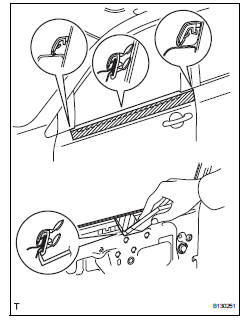
- Put protective tape under the belt moulding.
- Using a moulding remover, detach the claws to remove the belt moulding as shown in the illustration.
Hint:
Tape the remover tip before use.
Notice:
Be careful when removing the belt moulding as there are claws attached to the front and rear ends of the belt moulding.
 Front door belt moulding
Components
...
 Installation
Hint:
Use the same procedures for the rh side and lh side.
The procedures listed below are for the lh side.
Install front door belt moulding
assembly lh
Attach the claws to ins ...
Other materials:
If a warning light turns
on or a warning buzzer
sounds
Calmly perform the following actions if any of the warning lights
comes on or flashes. If a light comes on or flashes, but then
goes off, this does not necessarily indicate a malfunction in the
system. However, if this continues to occur, have the vehicle
inspected by your toyota dealer.
Stop t ...
Removal
Hint:
Use the same procedures for the rh side and lh side.
The procedures listed below are for the rh side.
Remove no. 2 Seat hinge cover lh
Fully tilt the seatback forward.
Attach the 2 claws and clip.
Pull the hinge cover in the direction indicated by the
arrow ...
Glossary of sae and toyota terms
This glossary lists all sae-j1930 terms and abbreviations
used in this manual in compliance with sae
recommendations, as well as their toyota equivalents.
...
