
Toyota RAV4 (XA40) 2013-2018 Service Manual: Terminals of ecu
- Check occupant classification ecu
- Measure the voltage of the connector.
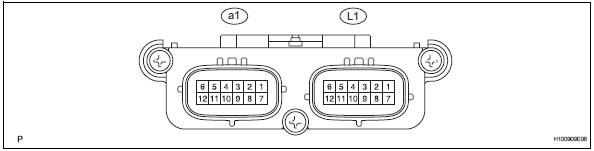
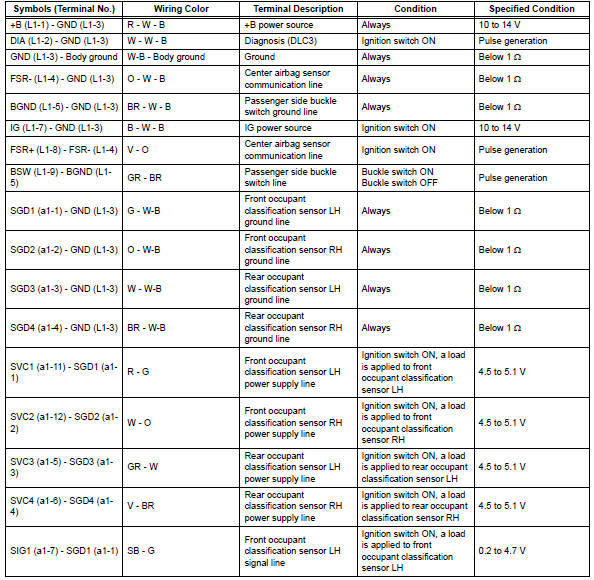
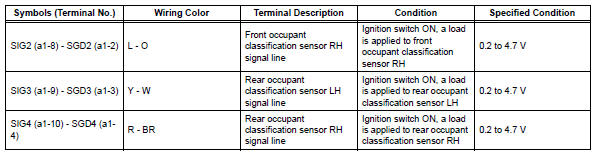
 Problem symptoms table
Hint:
Use the table below to help determine the cause of the
problem symptom. The potential causes of the symptoms
are listed in order of probability in the "suspected area"
column ...
 Diagnosis system
Description
The occupant classification ecu controls the functions of
the occupant classification system on the vehicle. Data
of the occupant classification system can be read in the
data lin ...
Other materials:
Dtc check / clear
Check dtc (using intelligent tester)
Connect the intelligent tester (with can vim) to the
dlc3.
Turn the ignition switch on.
Read the dtcs by following the directions on the
tester screen.
Hint:
Refer to the intelligent tester operator's manual for
further details.
Chec ...
Battery current sensor
On-vehicle inspection
Check battery current sensor assembly
Measure the resistance of the sensor.
Standard resistance
If the result is not as specified, replace the sensor
assembly.
Measure the resistance of the sensor.
Standard resistance
If the result is not as specified, ...
Problem symptoms table (2006/01- )
Hint:
Use the table below to help determine the cause of the
problem symptom. The potential causes of the symptoms are
listed in order of probability in the "suspected area" column
of the table. Check each symptom by checking the suspected
areas in the order they are listed. Replace p ...
