
Toyota RAV4 (XA40) 2013-2018 Service Manual: Installation
- Install starter assembly
- Install the starter with the 2 bolts.
Torque: 37 n*m (377 kgf*cm, 27 ft.*Lbf)
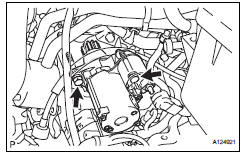
- Connect the starter connector.
- Install the terminal nut and cover the nut with the cap.
Torque: 9.8 N*m (100 kgf*cm, 7 ft.*Lbf)
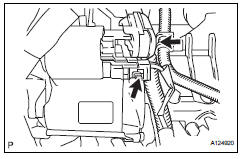
- Install battery bracket reinforcement
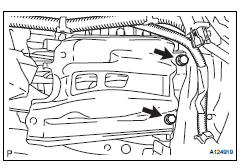
- Install the bracket reinforcement.
Torque: 19 n*m (194 kgf*cm, 14 ft.*Lbf)
- Install front battery bracket
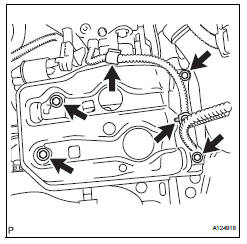
- Install the bracket front with the 4 bolts.
Torque: 19 n*m (194 kgf*cm, 14 ft.*Lbf)
- Attach the 2 wire harness clamps.
- Install battery
- Install battery insulator
- Install battery clamp
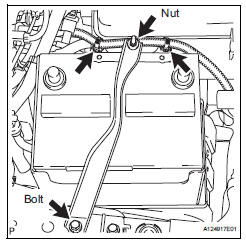
- Attach the hook of the battery clamp to the battery bracket front.
- Temporarily tighten the nut and install the bolt.
- Adjust the battery clamp's position.
- Fully tighten the nut and bolt.
Torque: 5.0 N*m (51 kgf*cm, 44 in.*Lbf)
- Attach the 2 wire harness clamps.
- Connect cable to positive battery terminal
- Connect cable to negative battery terminal
 Reassembly
Hint:
Use high-temperature grease to lubricate the bearings,
gears, return spring and steel ball when assembling the
starter.
Install planetary gear
Apply grease to the planetary gears an ...
 Starter relay
On-vehicle inspection
Disconnect cable from negative battery
terminal
Caution:
Wait at least 90 seconds after disconnecting the
cable from the negative (-) battery terminal to
prevent airb ...
Other materials:
Turn signal lever
Operating instructions
Right turn
Lane change to the right
(move the lever partway and
release it)The right hand signals will flash 3
times.
Lane change to the left
(move the lever partway and
release it)
The left hand signals will flash 3
times.
Left turn
â– Turn signals can be operat ...
Winter driving tips
Carry out the necessary
preparations and inspections
before driving the
vehicle in winter. Always
drive the vehicle in a manner
appropriate to the prevailing
weather conditions.
Pre-winter preparations
Use fluids that are appropriate
to the prevailing outside temperatures.
Engine oil
Engine c ...
Steering angle sensor zero point malfunction
Description
The skid control ecu learns the steering sensor zero point every time the
ignition switch is turned on and
the vehicle is driven at 35 km/h (22 mph) or more for approximately 5 seconds.
The ecu also stores the
previous zero point.
If front wheel alignment or the steering wh ...
