
Toyota RAV4 (XA40) 2013-2018 Service Manual: Terminals of ecu (2006/01- )
- Check air conditioning amplifier
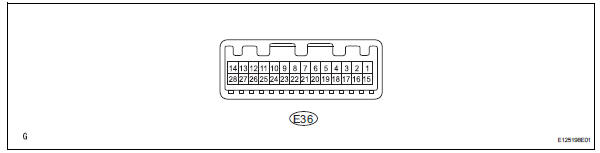
- Measure the voltage and resistance of the connectors.
Hint:
Check from the rear of the connector while it is connected to the air conditioning amplifier.
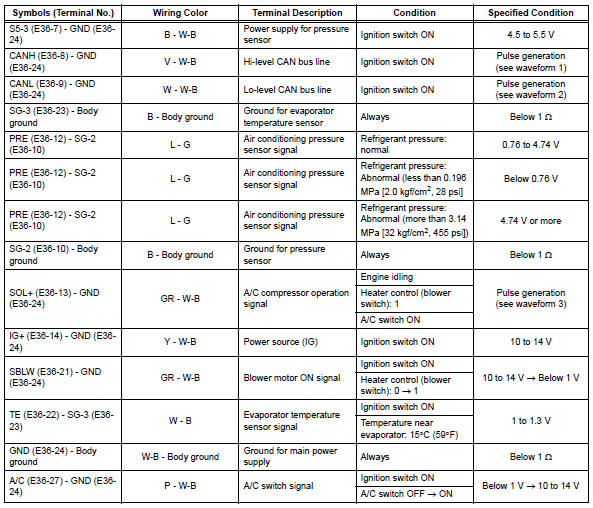
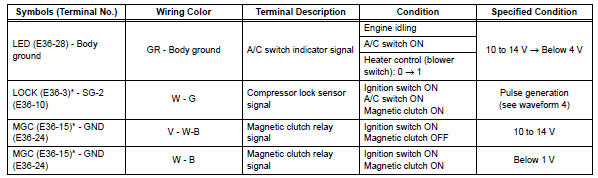
Hint:
*: For 2gr-fe
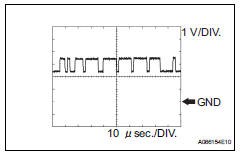
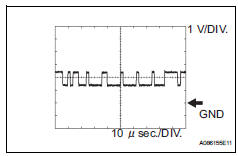
- Using an oscilloscope, check waveform 1.
Can communication signal 
Hint:
The waveform varies depending on the can communication signal.
- Using an oscilloscope, check waveform 2.
Can communication signal 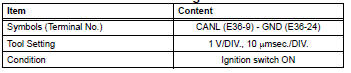
Hint:
The waveform varies depending on the can communication signal.
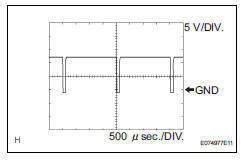
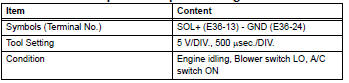
- Using an oscilloscope, check waveform 3.
A/c compressor* operation signal
Hint:
*: Compressor and pulley for 2az-fe, compressor and magnetic clutch for 2gr-fe
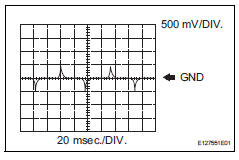
- Using an oscilloscope, check waveform 4.
Compressor lock sensor signal* 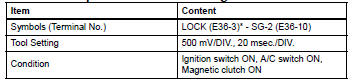
Hint:
*: For 2gr-fe
 Terminals of ecu (2005/11-2006/01)
Check air conditioning amplifier
Measure the voltage and resistance of the
connectors.
Hint:
Check from the rear of the connector while it is
connected to the air conditioning ampl ...
 Diagnosis system
Description
Air conditioning system data and the diagnostic
trouble codes (dtcs) can be read through the
data link connector 3 (dlc3) of the vehicle. When
the system seems to be malfunc ...
Other materials:
Heated oxygen sensor
Components
Removal
Disconnect cable from negative battery
terminal
Caution:
Wait at least 90 seconds after disconnecting the
cable from the negative (-) battery terminal to
prevent airbag and seat belt pretensioner activation.
Remove heated oxygen sensor (for bank 1 sensor 2)
...
Gauges and meters (with 7- inch multi-information
display)
The meters display various drive information.
Meter display
The display of the speedometer can be selected from two types,
analog or digital.
Analog speedometer
The units used on the meter and display may differ depending on the target
region.
Tachometer
Displays the engine speed in revolutions ...
Problem symptoms table
Hint:
Use the table below to help determine the cause of the
problem symptom. The potential causes of the symptoms
are listed in order of probability in the "suspected area"
column of the table. Check each symptom by checking the
suspected areas in the order they are listed. Re ...
