
Toyota RAV4 (XA40) 2013-2018 Service Manual: Yaw rate sensor communication stop mode
Description

Wiring diagram
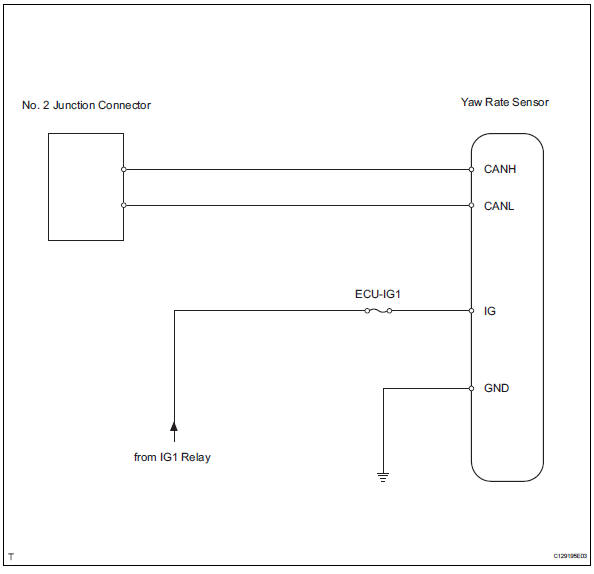
Inspection procedure
Notice:
- Turn the ignition switch off before measuring the resistances of the main wire and the branch wire.
- After the ignition switch is turned off, check that the key reminder warning system and light reminder warning system are not in operation.
- Before measuring the resistance, leave the vehicle for at least 1 minute and do not operate the ignition switch, any switches or doors. If doors need to be opened in order to check connectors, open the doors and leave them open.
Hint:
Operating the ignition switch, any switches or any doors triggers related ecu and sensor communication with the can, which causes resistance variation.
- Check can bus line for disconnection (yaw rate sensor branch wire)
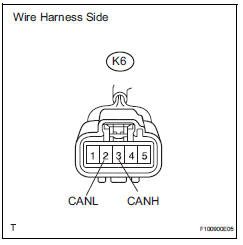
- Disconnect the k6 yaw rate sensor connector.
- Measure the resistance of the wire harness side connector.
Standard resistance


- Check wire harness (yaw rate sensor - battery and body ground)
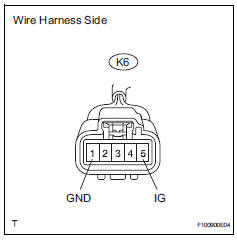
- Disconnect the k6 yaw rate sensor connector.
- Measure the resistance of the wire harness side connector.
Standard resistance
- Measure the voltage of the wire harness side connector.
Standard voltage


Replace yaw rate sensor
 Steering angle sensor communication stop mode
Description
Wiring diagram
Inspection procedure
Notice:
Turn the ignition switch off before measuring the resistances of the
main wire and the branch
wire.
After the ignition swi ...
 Ecm communication stop mode (2005/11-2006/01)
Description
Wiring diagram
Inspection procedure
Notice:
Turn the ignition switch off before measuring the resistances of the
main wire and the branch
wire.
After the ignition swi ...
Other materials:
Curtain shield airbag assembly
Components
On-vehicle inspection
Check curtain shield airbag assembly (vehicle not involved in
collision)
Perform a diagnostic system check (see page rs-
49).
With the curtain shield airbag assembly installed on
the vehicle, perform a visual check. If any of the
defects ...
Taillight relay circuit
Description
When the light control switch, located on the headlight dimmer switch, is
turned to the tail position, the
taillight relay (marking: t-lp) turns on to illuminate the front side marker
lights, rear taillights, side marker
lights and license plate light.
Wiring diagram
Ins ...
Trailer Tongue Weight
A recommended tongue
weight varies in accordance
with the types of trailers or
towing as described below.
To ensure the recommended
values shown below, the
trailer must be loaded by
referring to the following
instructions.
Tongue Weight
The gross trailer weight should be
distribut ...
