
Toyota RAV4 (XA40) 2013-2018 Service Manual: Engine immobiliser system
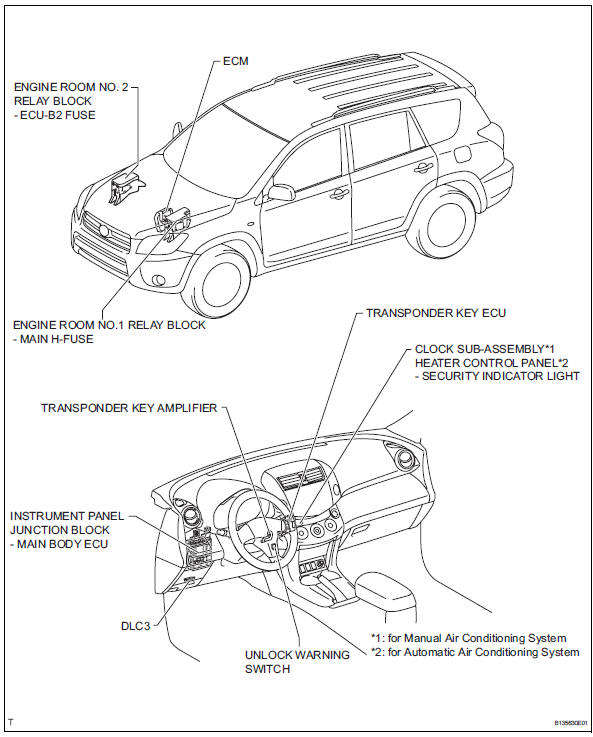
Parts location
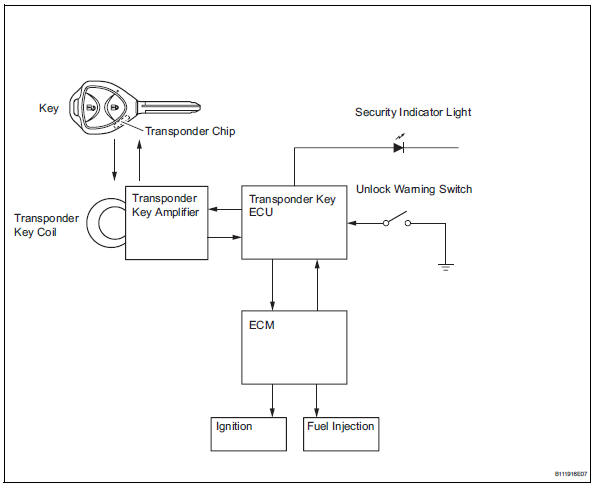
System diagram
- System description
- How to proceed with troubleshooting
- Registration
- Problem symptoms table
- Terminals of ecu

 System description
Engine immobiliser system description
The engine immobiliser system is designed to prevent
the vehicle from being stolen. This system uses a
transponder key ecu that stores the key codes of
a ...
Other materials:
Fog light switch
The fog lights secure excellent visibility in difficult driving
conditions,
such as in rain and fog.
(U.S.A.) Or (canada)
turns the fog lights off
Turns the fog lights on
Fog lights can be used when
The headlights are on in low beam. ...
Replacement
Replace generator drive end frame bearing
Remove the 4 screws and bearing retainer.
Using sst and a hammer, tap out the bearing.
Sst 09950-60010 (09951-00250), 09950-70010
(09951-07100)
Using sst and a press, press in a new bearing.
Sst 09950-60010 (09951-00250), 09 ...
Power seat switch
Inspection
Inspect front power seat switch
Measure the resistance between the terminals when
each switch is operated.
Standard resistance
Slide switch
Front vertical switch
Lifter switch
Reclining switch
If the result is not as specified, replace the switch. ...
