
Toyota RAV4 (XA40) 2013-2018 Service Manual: Fail-safe chart
If a problem occurs in the electric power steering system, the p/s warning light will come on in the combination meter and steering power assist will be stopped, fixed at a particular point, or decreased simultaneously to protect the system.
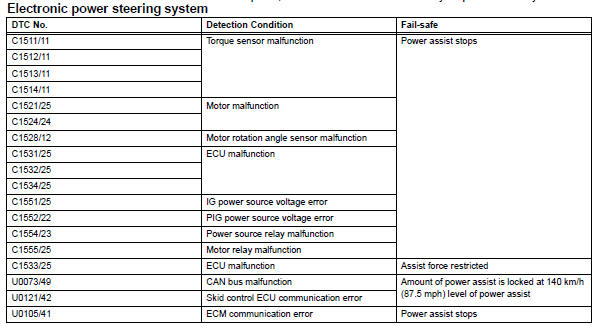
Hint:
The amount of power assist may be decreased to prevent the motor and ecus from overheating if the steering wheel is continuously turned when the vehicle is either stopped or driven at a low speed, or if the steering wheel is kept at either full lock position for a long time. In such cases, the amount of power assist returns to normal if the steering wheel is not turned for approximately 10 minutes with the engine idling.
 Freeze frame data
Freeze frame data
Notice:
It is difficult to show the specified values
(judgment values) clearly because freeze frame
data values change significantly due to
differences in measurement ...
 Data list / active test
Read data list
Hint:
Using the intelligent tester's data list allows switch,
sensor, actuator and other item values to be read without
removing any parts. Reading the data list early in
trou ...
Other materials:
Sensor detection display,
object distance
â– Detection range of the sensors
Approximately 3.3 ft. (100
cm)
Approximately 4.9 ft. (150
cm)
Approximately 2.1 ft. (63 cm)
The diagram shows the detection
range of the sensors. Note that the
sensors cannot detect objects that are extremely close to the vehicle.
The range of the sensors ...
Ignition key cylinder light
Components
Removal
Disconnect cable from negative battery
Caution:
Wait at least 90 seconds after disconnecting the
cable from the negative (-) battery terminal to
prevent airbag and seat belt pretensioner activation.
Place front wheels facing straight ahead
Remove steering pad ...
General maintenance
Listed below are the general maintenance items that should be
performed at the intervals specified in the “owner’s warranty
information booklet� or “owner’s manual supplement/scheduled
maintenance guide�. It is recommended that any problem
you notice should be brought to the attentio ...
