
Toyota RAV4 (XA40) 2013-2018 Service Manual: Removal
- Disconnect cable from negative battery terminal
Caution:
Wait at least 90 seconds after disconnecting the cable from the negative (-) battery terminal to prevent airbag and seat belt pretensioner activation.
- Remove air cleaner cap (see page es-411)
- Remove air cleaner case
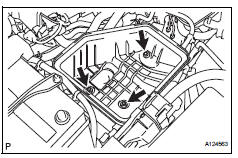
- Disconnect the harness clamp.
- Remove the 3 bolts and air cleaner case.
- Remove ecm
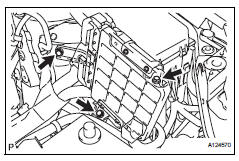
- Remove the 3 bolts of the ecm with bracket.
- Disconnect the 2 ecm connectors.
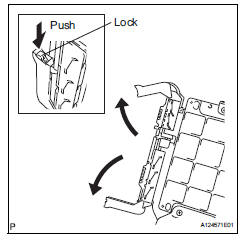
Notice:
After disconnecting the connector, make sure that dirt, water and other foreign matter does not contact the connecting part of the connector.
- Raise the 2 levers while pushing the locks on the 2 levers, and disconnect the 2 ecm connectors.
- Remove the ecm with bracket.
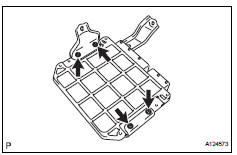
- Remove the 4 screws and 2 ecm brackets.
 ECM
ECM
Components
...
 Installation
Install ecm
Install the 2 brackets to the ecm with the 4 screws.
Torque: 3.0 N*m (30 kgf*cm, 27 in.*Lbf)
Connect the 2 ecm connectors.
Notice:
When connecting the connector, ma ...
Other materials:
Data list / active test (2005/11-2006/01)
Read data list
Read data list
Hint:
Using the intelligent tester's data list allows switch,
sensor, actuator and other item values to be read without
removing any parts. Reading the data list early in
troubleshooting is one way to save time.
Connect the intelligent tester (wi ...
How to proceed with troubleshooting
Hint:
Use the procedure to troubleshoot the power door lock
control system.
*: Use the intelligent tester.
Vehicle brought to workshop
Inspect battery voltage
Standard voltage:
11 to 14 v
If the voltage is below 11 v, recharge or replace the battery
before proceeding.
...
Vehicle load limits
Vehicle load limits include
total load capacity, seating
capacity, TWR (Trailer
Weight Rating) and cargo
capacity.
Total load capacity (vehicle
capacity weight):
Total load capacity means the
combined weight of occupants,
cargo and luggage.
Seating capacity:
Seating capacity means the
max ...
