
Toyota RAV4 (XA40) 2013-2018 Service Manual: Charging generator
Components
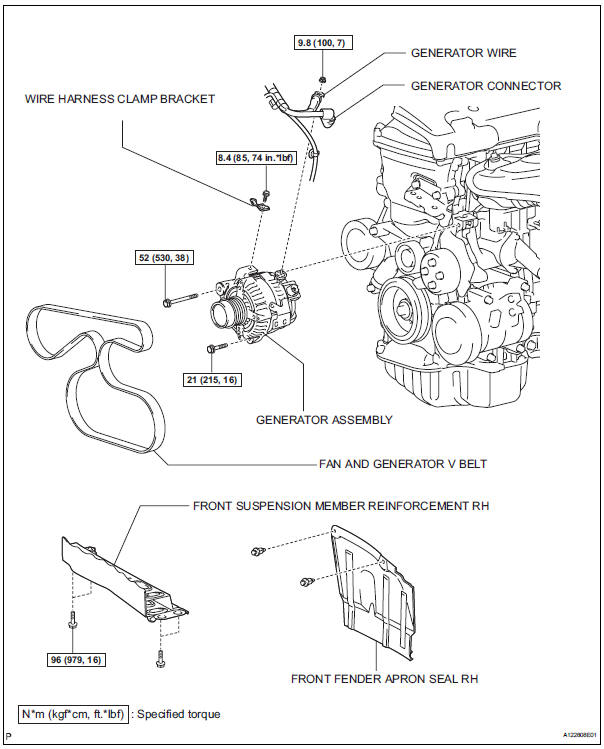
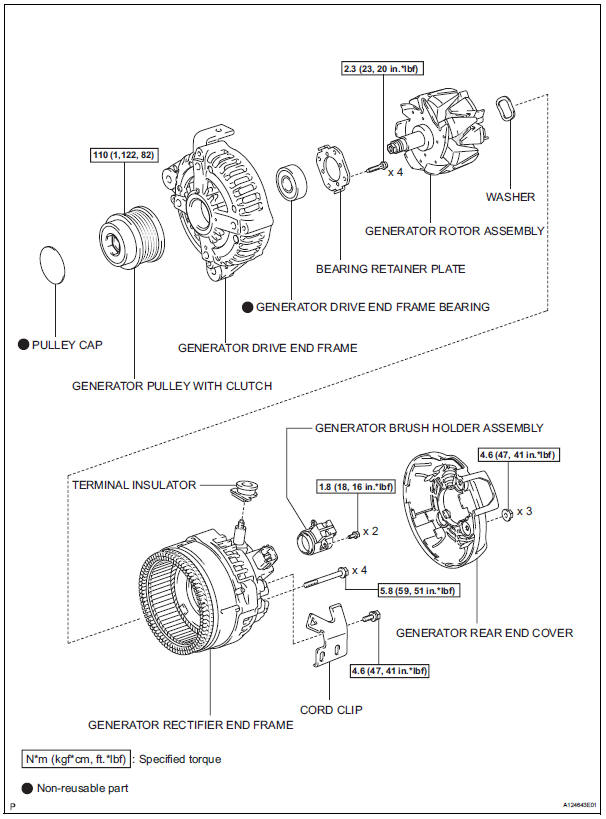
 On-vehicle inspection
Check battery condition
Notice:
If the battery is weak or if the engine is difficult to
start, perform the following procedures.
Check the battery for damage and deformation. If
severe d ...
 Removal
Disconnect cable from negative battery
terminal
Caution:
Wait at least 90 seconds after disconnecting the
cable from the negative (-) battery terminal to
prevent airbag and seat belt preten ...
Other materials:
Outside rear view mirrors
The rear view mirror's position
can be adjusted to
enable sufficient confirmation
of the rear view.
â– When using the outside rear
view mirrors in a cold weather
When it is cold and the outside rear
view mirrors are frozen, it may not
be possible to fold/extend them or
adjust the mirror surface. Rem ...
If the vehicle battery is discharged
The following procedures
may be used to start the
engine if the vehicle's battery
is discharged.
You can also call your
Toyota dealer or a qualified
repair shop.
Restarting the engine
If you have a set of jumper (or
booster) cables and a second
vehicle with a 12-volt battery,
you can jump start you ...
Window lock switch
Press the switch to lock the passenger
window switches.
Use this switch to prevent children
from accidentally opening or closing
a passenger window.
The power windows can be operated when
Vehicles without a smart key system
The engine switch is in the “on� position.
Vehicles ...
