
Toyota RAV4 (XA40) 2013-2018 Service Manual: Sliding roof system
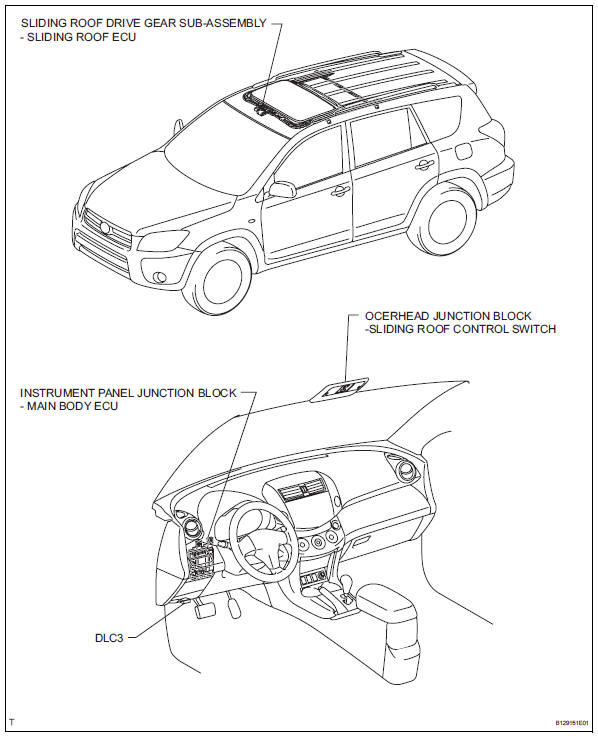
Parts location
System diagram
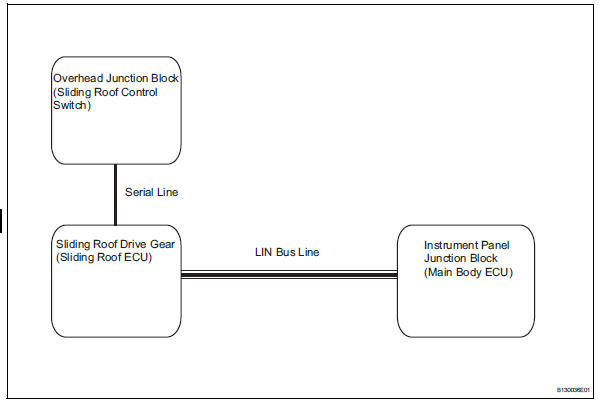
Communication table

- System description
- How to proceed with troubleshooting
- Initialization
- Problem symptoms table
- Terminals of ecu
- Diagnosis system
- Dtc check / clear
- Data list / active test
- On-vehicle inspection
 Sliding roof
...
 System description
General
This system has the following functions: manual slide
open and close; auto slide open and close; manual tilt up
and down; auto tilt up and down; jam protection; and key
off operation. ...
Other materials:
When closing the back door
Lower the back door using the
back door handle.
Vehicles without a power back
door
Make sure to push the back door
down from the outside to close it.
Vehicles with a power back
door
The back door closing assist will
activate, and the back door will
fully close automatically.
...
Reassembly
Install wiring harness clamp bracket
Install the bracket with the bolt.
Install elbow tube
Install straight pin
Using a plastic hammer, install the 4 straight pins to
the rear differential carrier.
Thoroughly clean oil and water from the surface of
the rear different ...
System description
Description of system
A tire pressure warning antenna and receiver is
equipped with a tire pressure sensor and a
transmitter and is installed in each tire wheel. The
sensor measures the tire pressure and internal
temperature of the tire. Then the measured value
and transmitter id ...
