
Toyota RAV4 (XA40) 2013-2018 Service Manual: Diagnostic trouble code chart (2006/01- )
Hint:
When the air conditioning system functions properly, dtc b1400/00 is output.
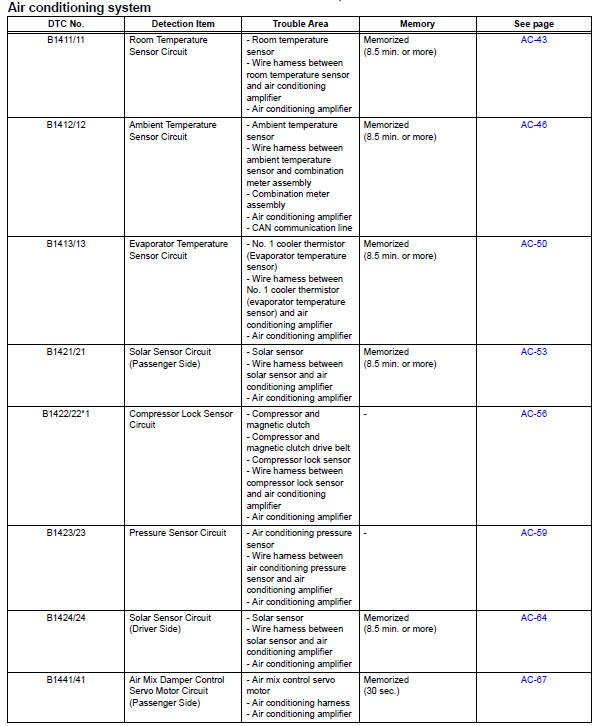
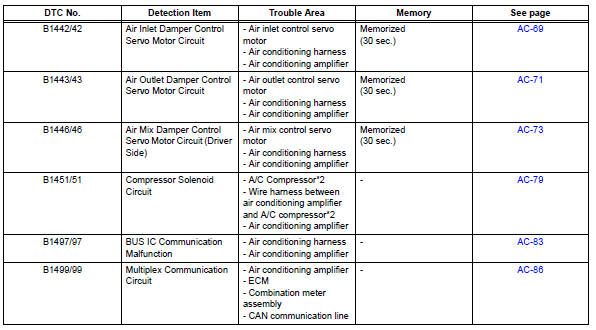
Hint:
*1: Dtc b1422/22 (compressor lock sensor circuit) is indicated only for a currently occurring malfunction for 2grfe.
To confirm dtc b1422/22, perform the following steps:
- With the ignition switch on, enter the dtc check mode.
- Press the r/f (recirculation/fresh) switch to enter actuator check mode, and set the operation to step no. 3.
- Press the auto switch to return to dtc check mode.
- The dtc is displayed after approximately 3 seconds.
*2: Compressor and pulley for 2az-fe, compressor and magnetic clutch for 2gr-fe
- Room temperature sensor circuit
- Ambient temperature sensor circuit
- Evaporator temperature sensor circuit
- Solar sensor circuit (passenger side)
- Compressor lock sensor circuit
- Pressure sensor circuit
- Solar sensor circuit (driver side)
- Air mix damper control servo motor circuit (passenger side)
- Air inlet damper control servo motor circuit
- Air outlet damper control servo motor circuit
- Air mix damper control servo motor circuit (driver side)
- Compressor solenoid circuit (2005/11-2006/01)
- Compressor solenoid circuit (2006/01- )
- Bus ic communication malfunction
- Multiplex communication circuit
- Air conditioning control panel does not operate
- Blower motor circuit
- Compressor circuit
- Ig power source circuit
- Back-up power source circuit
 Diagnostic trouble code chart (2005/11-2006/01)
Hint:
When the air conditioning system functions properly, dtc
b1400/00 is output.
...
 Room temperature sensor circuit
Description
The room temperature sensor is installed in the instrument panel to detect
the room temperature and
control the heater and air conditioner auto mode. The resistance of the room
t ...
Other materials:
Installation (2006/01- )
Install abs and traction actuator assembly with bracket
Notice:
do not remove the hole plug before connecting the
brake tube. new actuators are filled with brake fluid.
Install the actuator with bracket with the 3 nuts.
Torque: 19 n*m (194 kgf*cm, 14 ft.*Lbf)
Hint:
The nuts should b ...
Fuel information
You must only use unleaded gasoline in your vehicle.
Select octane rating 87 (research octane number 91) or higher.
Use of unleaded gasoline with an octane rating lower than 87
may result in engine knocking. Persistent knocking can lead to
engine damage.
At minimum, the gasoline you use sho ...
Brk relay
On-vehicle inspection
Inspect brk relay
Remove the brk relay from the engine room no. 1
Relay block.
Measure the resistance of the relay.
Standard resistance
If the result is not as specified, replace the relay. ...
